Creating Windows Installation Media on Linux
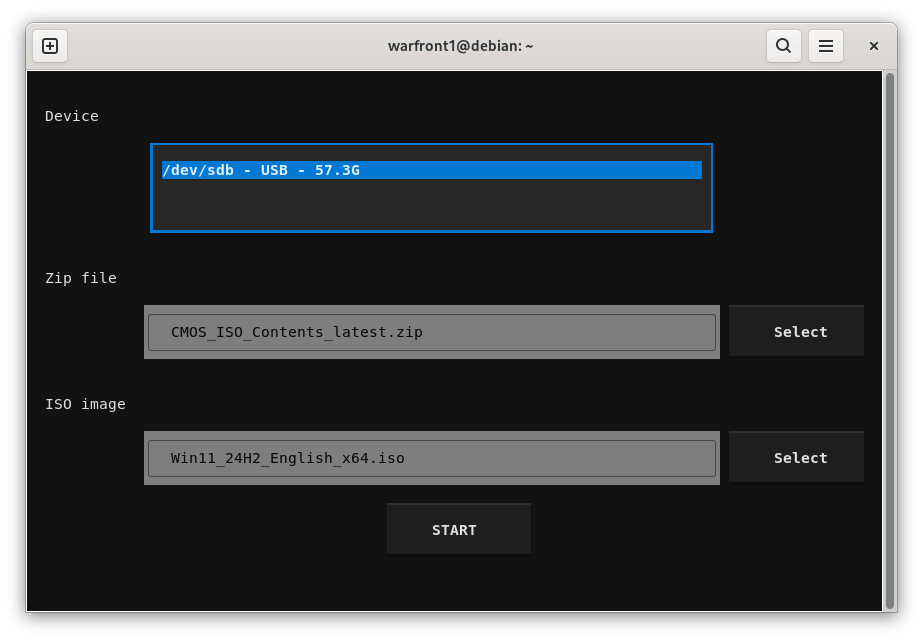
Let's discover USBZile in less than 5 minutes.
What you'll need
- An 8GB or larger USB stick/flash drive
- If you need one, we recommend and test with the following USB stick
- A PC running a 64-bit Linux distribution
- Windows Disk Image
Creating the Installation Media
On your Linux device
- Open Terminal
- Run the following command:
curl -fsSL https://www.usbzile.com/linux/latest | tar -xz && sudo ./USBZile - Under Device select the USB stick/flash drive that you want to turn into installation media
- Note: This process will delete all data on the selected USB stick/flash drive
- Under ISO image select the Windows Disk Image you downloaded earlier
- Click START, then wait for the USB flash drive to be created
Congratulations, you now have a Windows Installation Media USB!